Why We Didn't Upgrade to the Bigger GPU
The instinct, when you're setting up self-hosted inference, is to buy or provision the biggest GPU the budget allows. More VRAM feels like a safe default — more headroom, fewer constraints, room to grow.
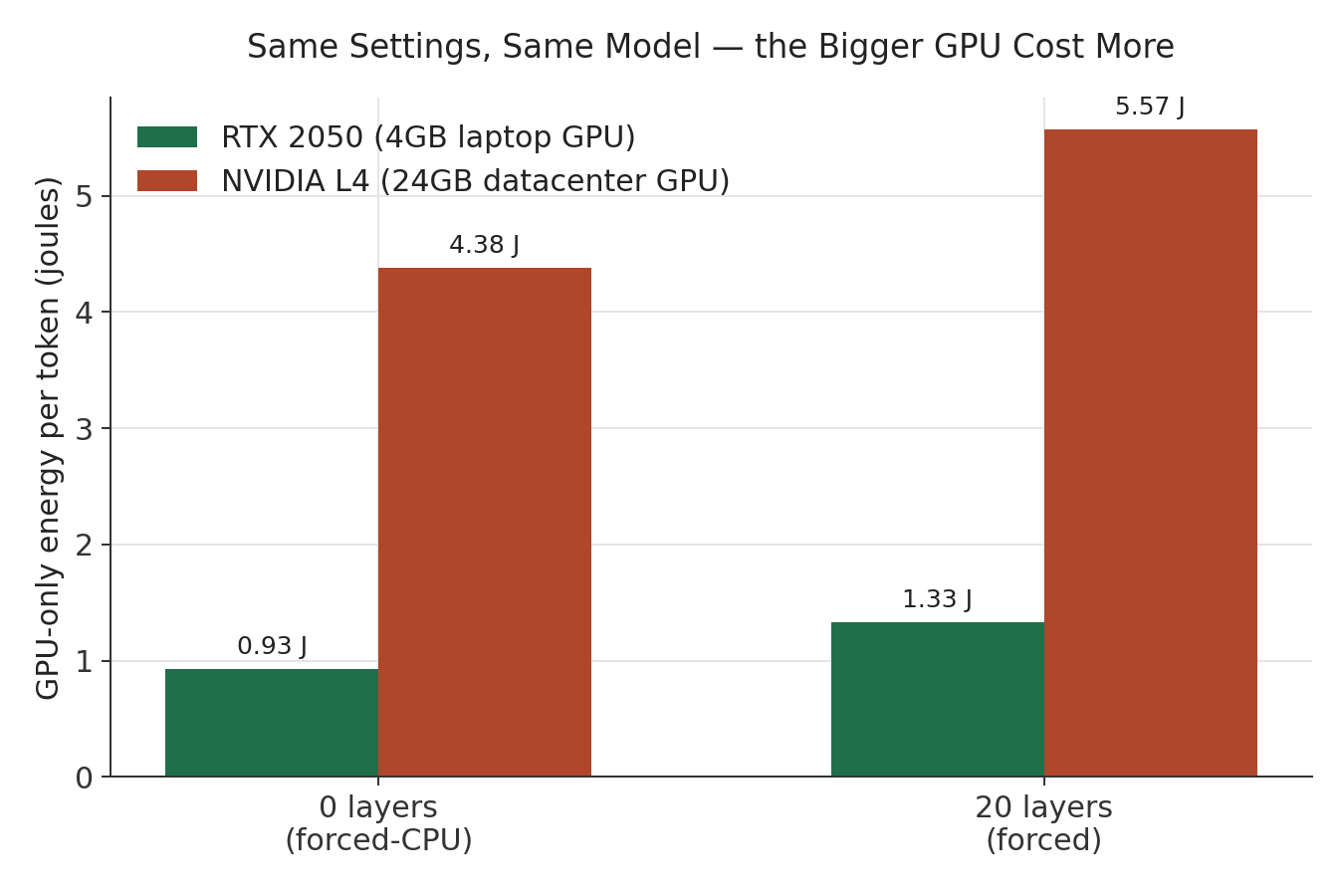
We tested that instinct directly. The result: at matched settings, a 24GB datacenter GPU was 4–5× less energy-efficient per token than a 4GB laptop GPU running the identical model. Bigger wasn't a safer default. It was worse, under a set of conditions that are easy to end up in by accident.
This is a standalone piece from our private LLM infrastructure series (E005), focused specifically on the hardware-selection question: what actually determines whether a GPU is a good fit for a given model, and why VRAM headroom alone doesn't answer that.
What we tested
We took the same 8B-parameter model and ran it on two very different cards: an RTX 2050, a 4GB laptop GPU, and an NVIDIA L4, a 24GB datacenter-class GPU — roughly six times the memory. Same model, same prompt, same GPU offloading settings (offloading is the setting that controls how much of a model's computation runs on the GPU versus falls back to CPU), tested across a range from 0% offload up to a full offload where the entire model sits in GPU memory.
The question: does more VRAM headroom translate into better cost-efficiency, or does something else determine that?
The direct comparison
At two settings tested identically on both cards — no GPU offload at all, and a fixed, moderate offload level — the results were unambiguous:
The 24GB card cost 4.7× more energy per token with zero GPU offload, and 4.2× more at the moderate offload setting — same model, same work, same configuration. Two measured reasons why:
Idle power floor. Even doing nothing but sitting there while the CPU handled the work, the datacenter GPU drew 13.4 watts against the laptop card's 3.9 watts. A bigger card costs more just to be powered on, before it does anything useful.
Utilization at the same setting. At the moderate offload level, the laptop GPU reached 34% utilization. The datacenter GPU, running the identical configuration, reached only 8.6% — under a quarter as busy, doing the same task. The larger card's compute is fast enough that most of the generation time was spent waiting on the CPU side of the split, not computing — which means a large share of its power draw during that window bought nothing.
But the story isn't "smaller is always better"
Here's the part that matters most for a hardware decision: the datacenter GPU's efficiency wasn't uniformly bad. It was bad specifically at partial offload — and excellent at full offload.
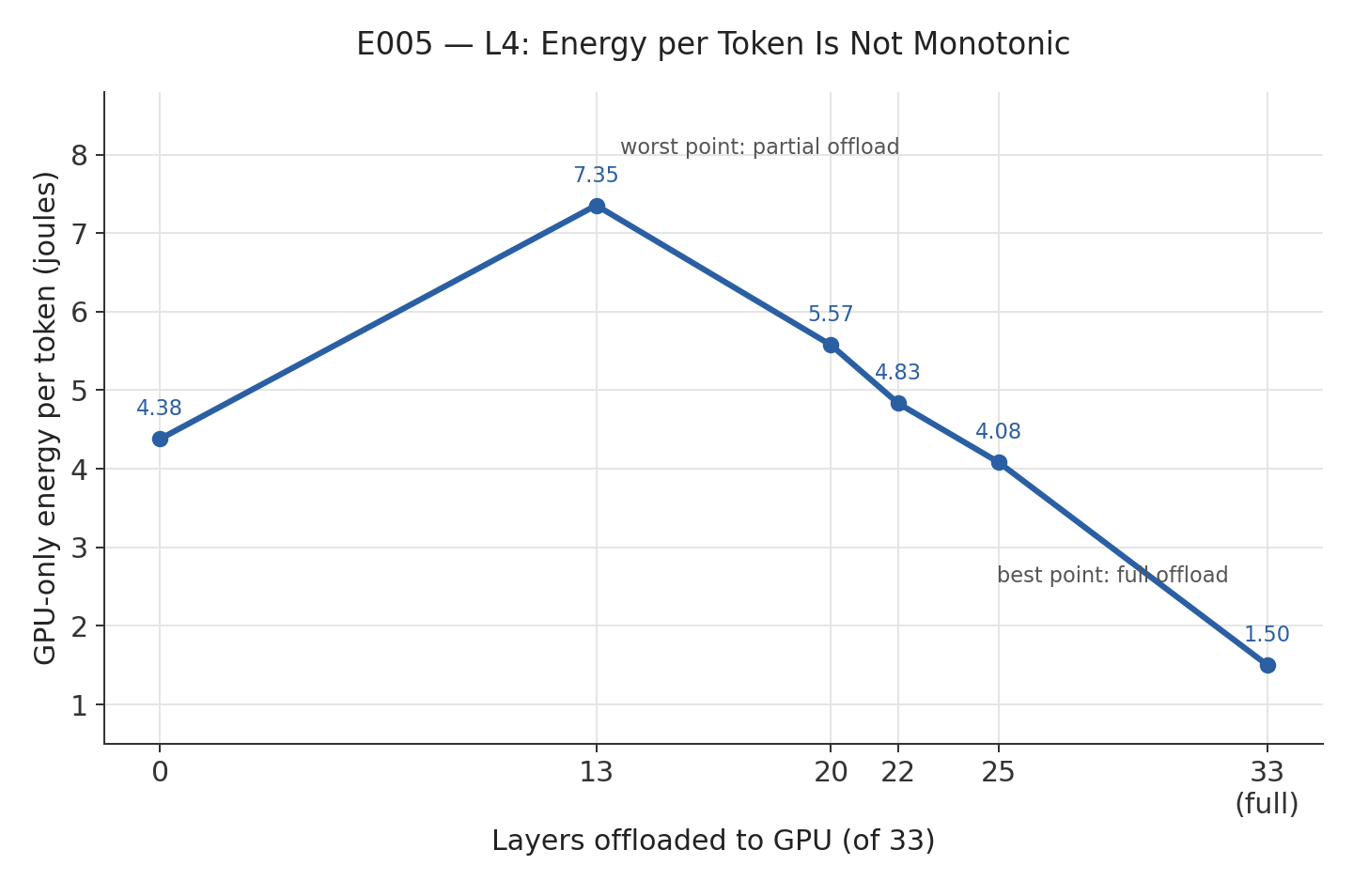
Energy per token on the L4 rose from 0 layers offloaded up to a partial-offload point, then fell steadily all the way through to full offload — where the entire model fits in the card's memory with room to spare. The worst point (partial offload) cost nearly 5× more per token than the best point (full offload, 1.50 joules per token) — the cheapest result measured anywhere in this experiment.
At full offload, utilization jumped from under 4% to 95.9%, and throughput increased nearly tenfold for only about double the power draw. The same card that looked like the wrong choice at partial offload became the most efficient option tested once it was actually being used the way its size suggested it should be.
The pattern: a GPU with room to spare for a model isn't automatically well-utilized by that model. A GPU that's too big for the workload it's given tends to sit partially idle while still drawing power — the worst of both a big power budget and low actual throughput. The same GPU, given a workload sized to actually fill it, is efficient.
A trap worth naming: "automatic" isn't a fixed setting
One more finding, specific to comparing hardware: most inference servers offer an "automatic" placement mode that decides how much of a model to offload based on available memory. This is not a fixed configuration — it resolves differently depending on the card.
On the 4GB laptop GPU, automatic placement fit roughly a third of the model's layers onto the GPU. On the 24GB datacenter GPU, automatic placement fit the entire model. If you compared "automatic" results across the two cards side by side, you'd be comparing two genuinely different configurations that happen to share a label — not a fair test of the hardware itself.
If you're benchmarking hardware options against each other, check what each system's "automatic" or "default" setting actually resolved to before treating a side-by-side comparison as apples-to-apples.
What this means for hardware selection
Size the GPU to the model, not the model to whatever GPU is available. If a model doesn't fully fit on the card you're considering, partial-fit is often the worst-efficiency zone — worse than a smaller card that fits the model entirely, and worse than not offloading much at all.
More VRAM is not a proxy for more efficiency. It's a proxy for more headroom — useful for future growth or larger models, but not something that pays off on the workload you're running today unless that workload actually fills the card.
Idle and partially-utilized GPU capacity is a real, measurable cost, not a rounding error. A datacenter GPU sitting at 4-9% utilization is still drawing double-digit watts continuously. If you're provisioning cloud GPU capacity for a workload that won't consistently fill it, that idle draw is a cost you're paying for headroom you're not using.
Before committing to a GPU tier, test the specific model at the specific offload level you'll actually run — not a spec sheet comparison, and not an "automatic" setting that might mean different things on different cards.
What's still open
This result is scoped to one model (an 8B-parameter model, one quantization), one specific pair of cards, and GPU-only energy measurement — the cloud environment used for the L4 testing had no usable CPU power telemetry, so we can't yet say whether accounting for CPU cost (which reversed a similar-looking finding elsewhere in this series) would change the picture on this hardware too. Whether the same "partial-offload is the expensive zone, full-offload is efficient" pattern holds for other model sizes or GPU pairings is untested — this is one measured pairing, not a universal law about GPU sizing.
Where this fits
This is one result from a six-experiment series measuring what private LLM inference actually costs and how to run it efficiently — including a separate finding that raising request concurrency, not hardware, was the single biggest cost lever we measured. The full synthesis is in The Metric That Kept Lying to Us.
Related reading: One Config Change Cut Our Inference Cost 4.8× · Build vs. Buy for Private LLM Inference
If you're choosing between GPU options for a real workload and want the actual numbers for your model and traffic pattern rather than a spec sheet comparison, book a call — this is exactly the kind of question worth measuring before you provision.